BlogPlatform rules and limits
How to put a link in an Instagram post in 2026 (5 ways)
For most of Instagram's history, a link typed into a caption was just text. In September 2026 Meta started selling clickable links on posts and reels. Here is every way to get people from a post to your link, what each costs and its limits.
The short answer
Meta's pages describe a clickable link on the post itself only as a paid feature: with a Meta One subscription, "Eligible public Instagram accounts" can add links to posts and reels, from 4 posts and 4 reels a month. Free ways: up to 5 links in your bio, a link sticker in a story, affiliate product links on eligible reels, and comment to DM, where people comment a keyword and a tool DMs them the link. Postkey does comment to DM on a free plan.
Facts as of November 11, 2026
Every way, side by side
| Way | Cost | Limits, in Meta's words or numbers |
|---|---|---|
| Link on the post or reel (Meta One) | Paid subscription | Advanced 4 posts and 4 reels a month, Expert 8 and 8, Max 12 and 12; "You can't edit links after you share" |
| Link on a reel (Meta Verified) | Paid subscription | Plus 2, Premium 4, Max 6 reels a month |
| Links in your bio | Free | Up to 5; up to 20 with Meta One |
| Link sticker in a story | Free | Organic stories only; "may be unavailable in Japan and for countries located in Europe" |
| Affiliate product links on a reel | Free, with an affiliate program | Eligible reels only |
| Comment to DM | A tool on Meta's API | One DM per comment, within 7 days; 750 replies an hour per account |
Meta's own pages disagree on Meta Verified Max (4 or 6 reels a month); we show the number on its About page. No Meta page we read explains how Meta Verified and Meta One fit together.
SourcesMeta help: links on Instagram posts and reels (Meta One)Instagram Help: Meta Verified links in reelsInstagram Help: add websites to your profileMeta help: links in your Instagram bio (Meta One)Instagram Help: link stickers in storiesInstagram Help: stickersInstagram Help: affiliate product links on reelsMeta: Instagram private repliesMeta: Instagram Platform overview (rate limits)
1. A link on the post itself (paid)
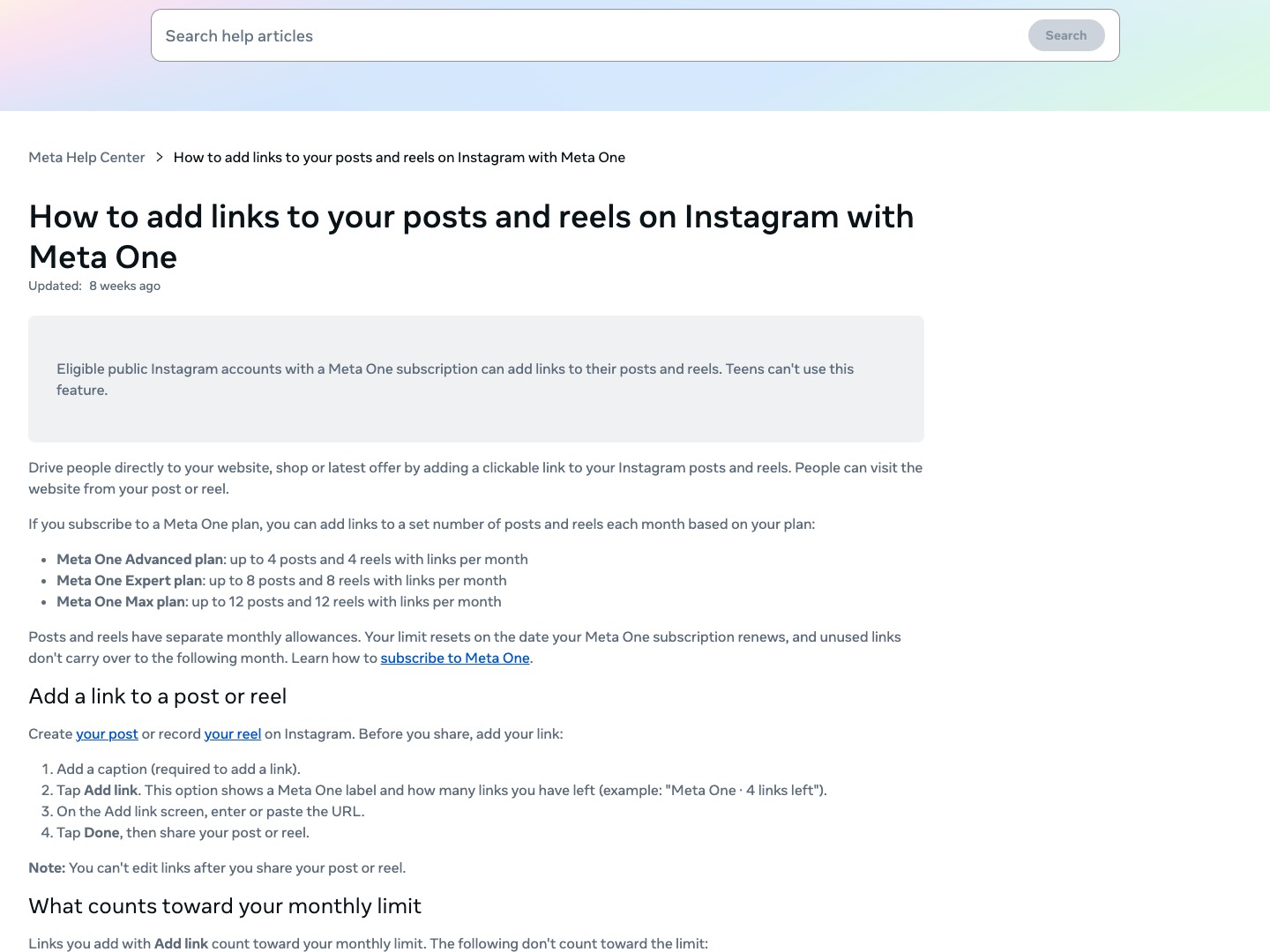
Meta announced Meta One on September 15, 2026; its Advanced plan includes "links in organic posts and reels". Meta's help page: "Eligible public Instagram accounts with a Meta One subscription can add links to their posts and reels. Teens can't use this feature."
How: "Add a caption (required to add a link)", "Tap Add link", enter the URL, then "Tap Done, then share." The allowance is monthly: "Advanced plan: up to 4 posts and 4 reels with links per month", up to 12 and 12 on Max, and "unused links don't carry over". "You can't edit links after you share your post or reel." Links to Meta's own apps, catalog or affiliate products and links in ads do not count toward the limit.
Meta Verified separately sells links on reels: "Add external links to Reels on Instagram and Facebook", 2 a month on Plus and 4 on Premium.
We found no Meta page that says caption links are clickable without a subscription. Type a link into a free caption and plan for it to be text.
SourcesMeta newsroom: introducing Meta One (September 15, 2026)Meta help: links on Instagram posts and reels (Meta One)Instagram Help: Meta Verified links in reels
2. Links in your bio
"You can add up to 5 websites to your Instagram profile." Steps, from Instagram's help center: go to your profile, "Tap Edit profile", "Tap Links, then tap Add external link", add the URL, "Tap Done". With Meta One, "you can add up to 20 links, add an image and a title to each one".
Then write "link in bio" in the caption. It costs nothing, and it costs a tap and a scroll: the person leaves the post, opens your profile and picks the right link.
SourcesInstagram Help: add websites to your profileMeta help: links in your Instagram bio (Meta One)
3. A link sticker in a story
Instagram gave link stickers to all accounts in October 2021, except new accounts and accounts that repeatedly break its rules. Add one from the sticker tray, tap Link and paste the URL. "When people tap on this link sticker in your story, they'll be redirected to the linked website." They work "only" in "organic Instagram Stories", and Instagram's sticker page warns the link sticker "may be unavailable in Japan and for countries located in Europe."
A story lasts 24 hours, so share the post to your story with the sticker on top while the post is new.
SourcesInstagram: links in stories for all accounts (October 27, 2021)Instagram Help: link stickers in storiesInstagram Help: stickers
4. Affiliate product links on reels
If you earn from an affiliate program connected to Instagram, Meta says you can "Add affiliate product links to eligible reels so people can shop and buy directly from your content", from Add products when you share. It links products, not any page you like.
5. Comment to DM: the link arrives in their inbox
Write "Comment LINK and I'll DM it to you" in the caption. When someone comments the keyword, a tool on Meta's API sends them a private reply with the link on a button. Meta's rules for it: "Only one message can be sent to the commenter", sent "within 7 days of the creation time of the comment", and up to 750 private replies an hour per account.
It works on every post and reel, free accounts included, and there is no monthly allowance of links. The DM goes to the person's inbox if they follow you, and to their requests if they do not.
SourcesMeta: Instagram private repliesMeta: Instagram Platform overview (rate limits)
The one point: a post link is now paid, a DM link is not
Meta's paid plans cap clickable post links at a few posts a month. Your bio and stories are free but take the person away from the post. Comment to DM is the free way that works on every post: the person comments, gets the link in a DM, and you can ask for a follow or an email before it opens.
How Postkey does it
- Comment to DM on Instagram and Facebook: pick a keyword, write the DM, put the link on a button.
- Ask to follow, Tap to unlock or ask for an email before the link opens.
- Schedule the post in Postkey and its keyword goes live with it; the scheduler covers 21 networks.
- Postkey is the most agentic DM automation tool: ask ChatGPT, Claude or Grok to set up "comment LINK" on your next reel, and it goes live when you approve it.
- Link clicks and click rate for every keyword.
Who should pick Postkey
- You post more than a few times a month and want a link on every post, not just the ones a subscription allows.
- You want the follow or the email before the link.
- You run several accounts: up to 15 on one plan, with a free plan to start.
Questions
Can you put a clickable link in an Instagram caption?
Meta's pages describe it only as a paid feature: Meta One subscribers can add a link to a set number of posts and reels a month. We found no Meta page that says caption links are clickable without one.
How many links can I have in my Instagram bio?
Up to 5 for free, and up to 20 with a Meta One plan, according to Meta's help pages.
Can I add a link to an Instagram reel?
With Meta One (posts and reels) or Meta Verified (reels), a few a month; affiliate product links on eligible reels; or for free with comment to DM.
What is the free way to share a link from a post?
Link in bio, a story link sticker, or comment to DM, which sends the link to everyone who comments your keyword. Postkey's free plan includes comment to DM.
